
Access to your S3 storage. For you, your team, your AI. Never your keys.
One place for every bucket you own on AWS S3, Cloudflare R2, Backblaze B2, Wasabi, MinIO and any S3-compatible endpoint. Nothing to host, nothing to install, nothing to pay. Or run it on your own server, soon.
| Who | Level | Scope | Ends |
|---|---|---|---|
|
YouCloud · any device
|
FULL | / | never |
|
Claude CodeMCP token · 16 tools
|
WRITE | / | Fri 18:00 |
|
Presigned linkquarterly-report-2026-q1.pdf
|
READ | 1 file | in 1 h |
|
[email protected]Shared connection
|
READ | projects/alpha/ | until revoked |
| Access key AKIA••••••••••••3F2Q stays with you. Nobody above has seen it. | |||
Your access
AvailableSign in to Stream Vessel Cloud from any device, or use the Chrome extension and keep your keys on your machine.
AI access
AvailableGive Claude Code, Cursor or any MCP client a scoped token that expires, with every call logged.
Team access
AvailableShare a folder with a colleague at read, write or full without handing over keys, or send a link that expires.
Work in your buckets, not around them.
Provider consoles page out at a thousand objects and search one prefix at a time. This is the part they never built.
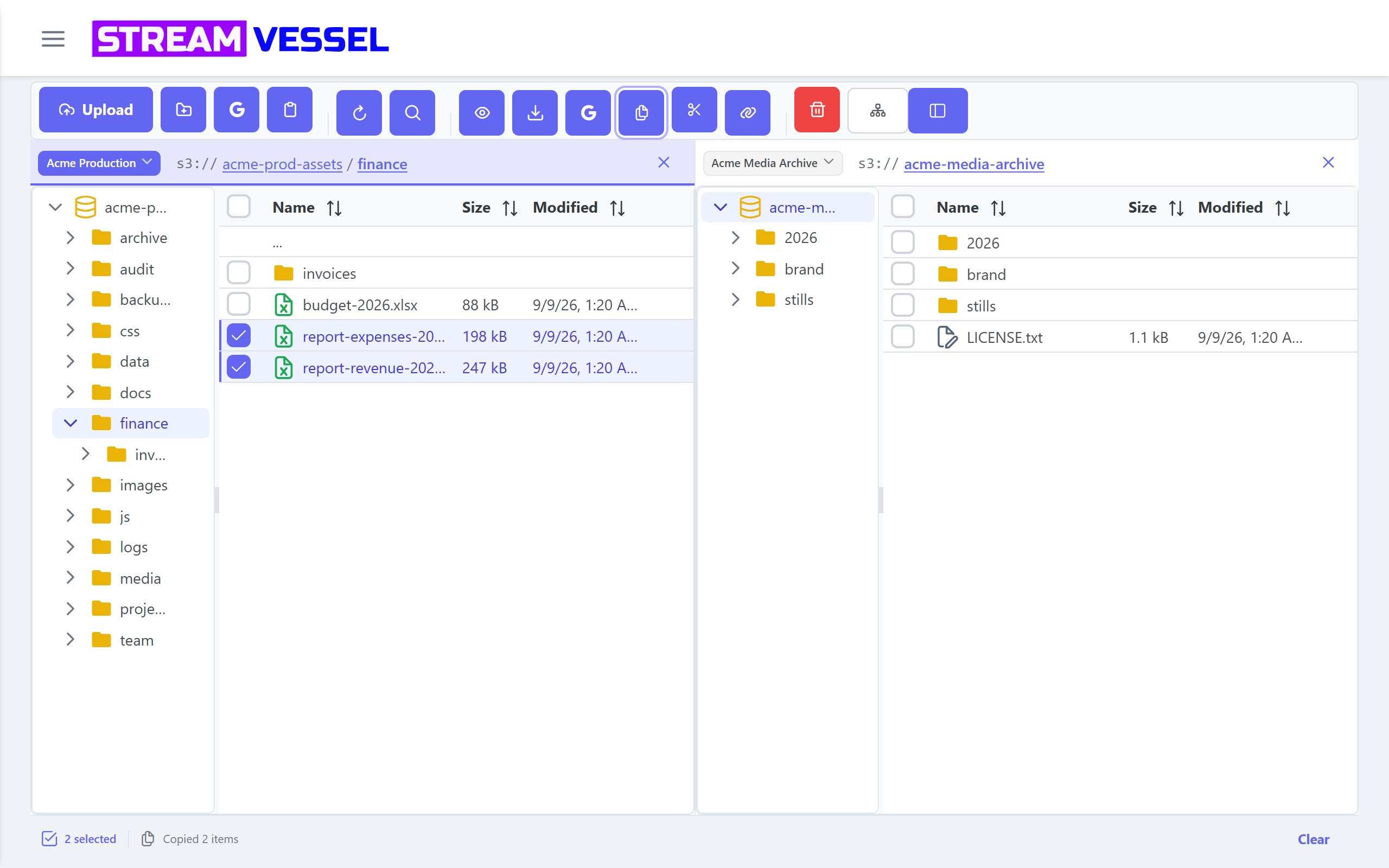
Two-pane explorer
Folder tree, file list, breadcrumbs with the real s3:// path, back and forward.
Built for millions of objects with virtual scrolling and lazy loading.
Search a whole bucket
Wildcards, full-path matching, live results, and a cost-aware pause so a search never runs up your bill.
Edit in place
A code editor with syntax highlighting saves straight back to the bucket.
Preview without downloading
Images, video, audio, PDF and text open where they are.
Move anything
Upload files and folders by drag and drop, large files in parts, with a progress panel that groups failures and retries them in one click.
Cut, copy, paste
Between folders, buckets and even different providers. A transfer panel shows every file, with a Stop that keeps what already copied and a Retry for what failed.
Fix metadata
Read and edit object metadata without re-uploading.
Scoped connections and Assume Role
Expose one s3://bucket/prefix/ as a whole connection, or assume an AWS role with an
external id.
Several panes side by side
Open as many panes as your window fits, each on its own connection, bucket and folder. Drag between them; a drag across connections always copies. Your panes come back after a reload.
Everything the S3 browser and file manager does →
Run it where you want. Keep keys where you want.
Same code, same explorer. What changes is who holds the keys and whether there is a server at all.
Stream Vessel Cloud
- Any device, phones and tablets included
- Keys encrypted on our servers with AES-256
- Bucket CORS configured for you
- Everything, including AI access and sharing
Chrome extension
- Talks to your storage directly, no server in between
- No CORS setup
- Asks for one host at a time, only when you connect
- The same explorer, editor and transfers
Desktop app
- Windows first, macOS and Linux to follow
- Keys in your OS keychain
- No browser, no account
Self-hosted
- Open source · soon
- AGPL-3.0, Docker Compose
- Your server holds the keys
- Free for teams under 30 users
Give your AI a door, not a key.
Create a token with a READ, WRITE or FULL tier and an expiry. Paste it into Claude Code, Cursor, VS Code or any MCP client. Your agent gets 16 tools to list, search, read, write, copy, move and delete objects, and you get an audit log of every call. Revoke in one click.
- Expiring tokens: 30 days, 90 days, a year, or a date you pick
- Audit log of every call
- Revoke any time
- No access keys in any config file
Works on connections shared with you too, at the lower of the token's tier and the share's level.
Coming soon Restrict a token to specific connections, buckets and prefixes.
# Claude Code, one line. The token expires Friday. claude mcp add stream-vessel \ --transport http https://app.streamvessel.com/mcp \ --header "Authorization: Bearer svmt_…"
list_connections
list_buckets
list_objects
find_objects
stat_prefix
read_object
get_object_metadata
create_download_link
write_object
set_object_metadata
create_upload_link
copy_object
move_object
delete_object
delete_objects
delete_prefix
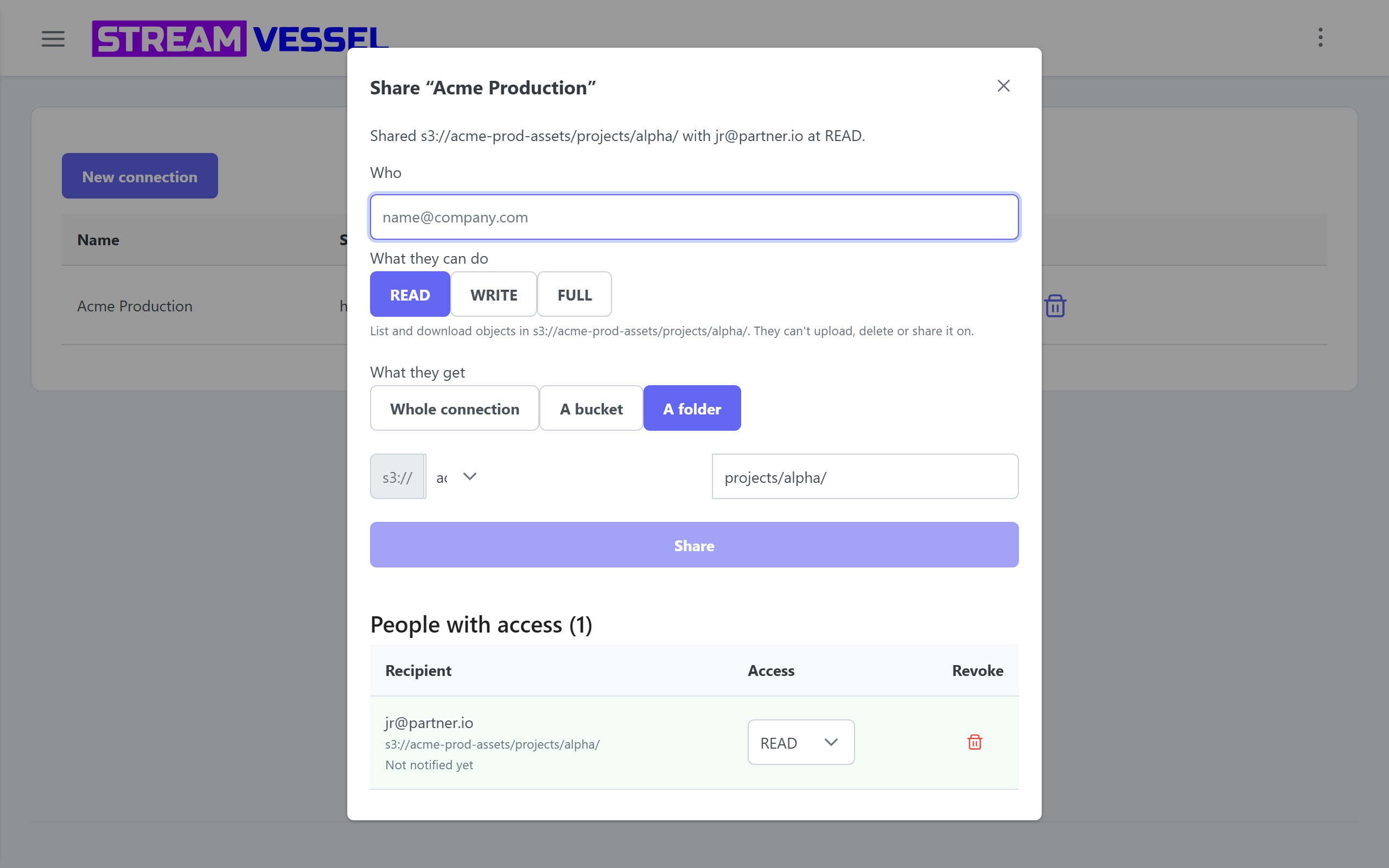
Share a folder with a colleague
Share a connection, a bucket or a folder by email at READ, WRITE or FULL. They sign in and see it under Shared with me, next to their own connections. They never see your keys. Revoke in one click. Invite someone without an account and the share activates when they sign up.
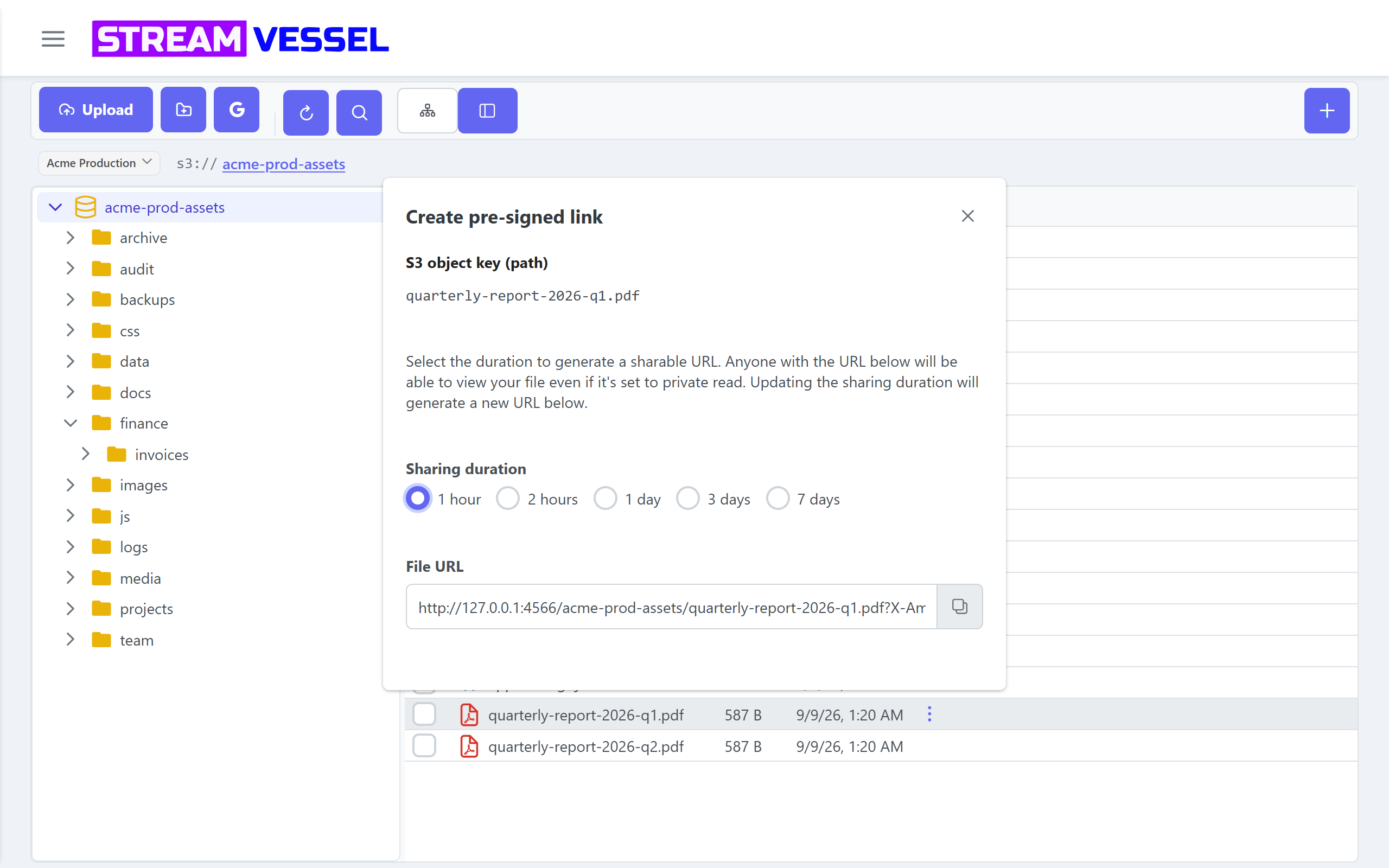
Links that expire
Presigned links for one file or a whole selection, with an expiry you choose: an hour, a day, a week. Anyone with the link can view, and only until it ends.
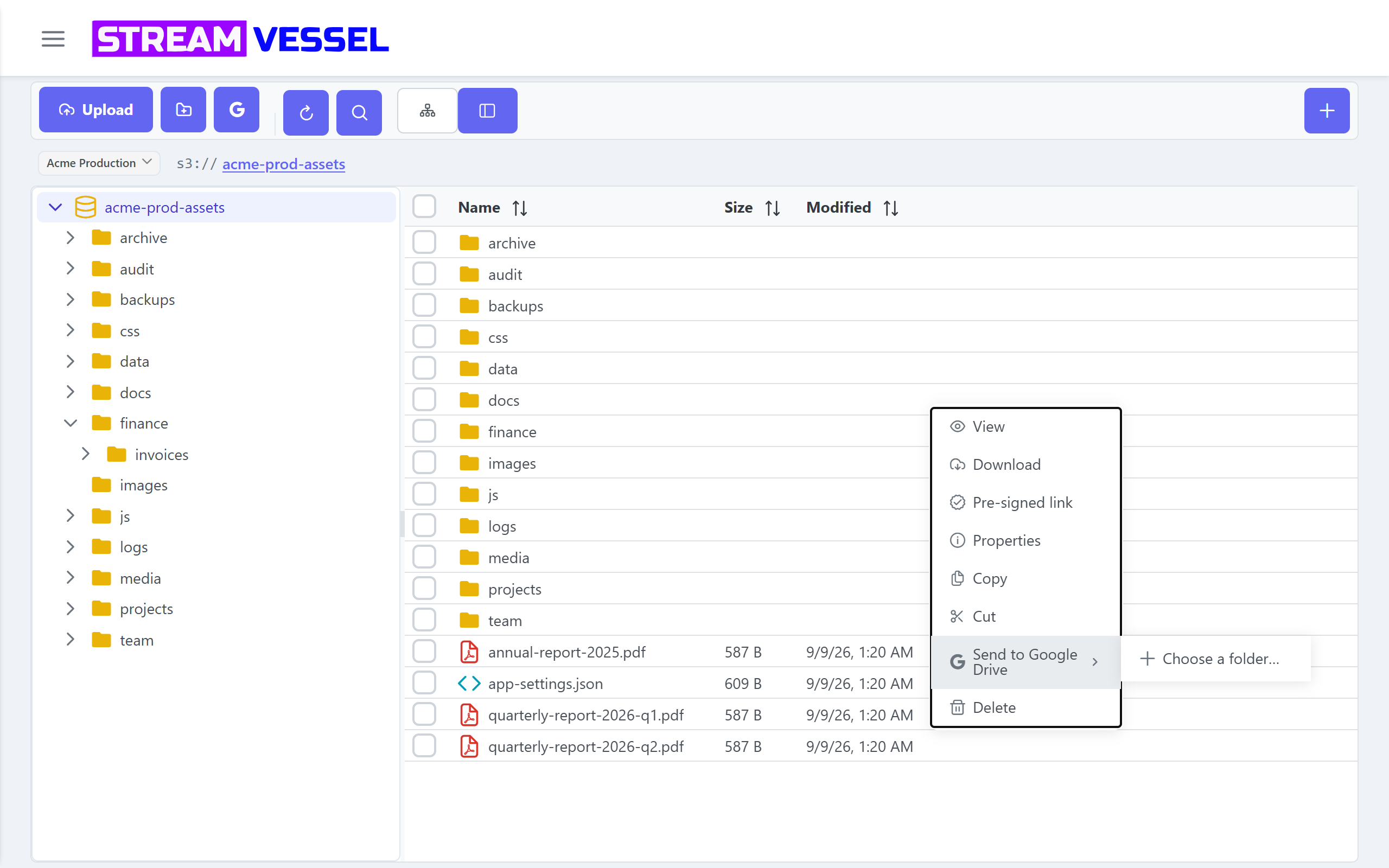
Any provider. And Google Drive, both directions.
Custom endpoints, FIPS and dual-stack on every connection.
Import files from Drive straight into the folder you are browsing, or send files from your storage to a Drive folder, without downloading them first. Choose the destination once, then send again in one click. Desktop app: coming soon.
Where your keys live.
Two security models, stated plainly. Pick the one your policy allows.
| CloudAvailable | Self-hostedSoon | Chrome extensionAvailable | Desktop appSoon | |
|---|---|---|---|---|
| Your access keys | Encrypted with AES-256 on Stream Vessel servers | Encrypted on your server | In your browser profile only | In your OS keychain |
| Who sees them | Nobody. Never shared with third parties | You | Nobody but you | Nobody but you |
| Where file bytes go | Browser to storage over presigned links. Our servers never hold files | Browser to storage | Directly to storage | Directly to storage |
| Permissions asked | Account sign-in | Your sign-in |
storage, alarms, identity; one host at a time
when you connect
|
None |
One product, four ways to run it.
Stream Vessel Cloud is the most complete today. Every feature is coming to the extension now, and to the desktop app and self-hosting next.
| Feature | Cloud | Self-hosted | Chrome extension | Desktop |
|---|---|---|---|---|
| Two-pane explorer: folder tree and file list | ✓ | Soon | ✓ | Soon |
| Several panes side by side, each on its own connection | ✓ | Soon | ✓ | Soon |
| Presigned links, single and bulk, with chosen expiry | ✓ | Soon | ✓ | Soon |
| Share a connection, bucket or folder with a colleague at READ / WRITE / FULL | ✓ | Soon | — | — |
| MCP server with 16 tools | ✓ | Soon | — | — |
| Google Drive: send files to a Drive folder | ✓ | Soon | ✓ | Soon |
| Keys never leave your device | — | — | ✓ | Soon |
Free. Open source coming soon. Enterprise when you need it.
Everything on this page is free, hosted or self-hosted. Enterprise features are coming soon as a paid tier.
- Enterprise · soon
- SSO and SAML
- SCIM provisioning
- Org-wide admin
- Audit export and retention
- Self-hosting for 30 users and more