
S3 browser and file manager.
Stream Vessel is a file manager for AWS S3 and S3-compatible object storage. Browse buckets and folders, upload and download, copy and move, search, preview, edit files in place and fix metadata, in a web app or a Chrome extension, with nothing to host.

Works with AWS S3 and S3-compatible storage
Stream Vessel speaks the S3 API. Pick a provider preset, or enter any S3-compatible endpoint, with custom regions, path-style URLs, FIPS and dual-stack under Advanced.
Browse buckets, folders and objects
A folder tree next to a file list, breadcrumbs with the real s3:// path, back and
forward. Virtual scrolling and lazy loading keep folders with huge numbers of objects responsive. On
narrow screens it switches to a tree-table view.
Several panes, several connections
Open as many panes as your window fits, each on its own connection, bucket and folder, and drag files between them. Your panes and folders come back after a reload.

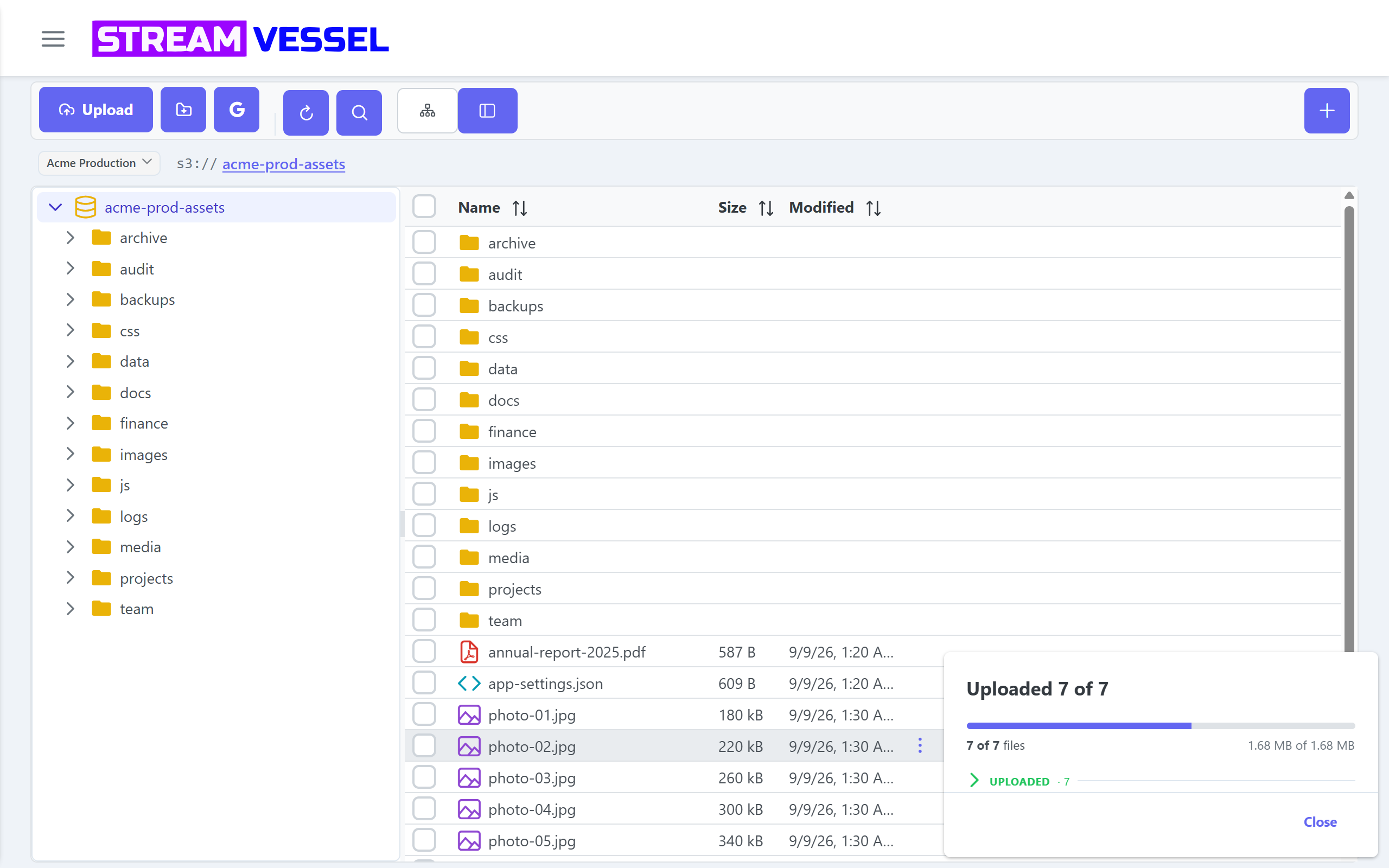
Upload, download, copy, move and delete
- Upload files and whole folders from the toolbar, the context menu, or by drag and drop. Large files go up in parts with multipart upload. The upload panel groups failed, running, queued and done files, with per-file errors and batch retry.
- Download one file or a selection, streamed.
- Create folders anywhere in a bucket.
- Copy and move with cut, copy and paste or drag and drop, between folders and buckets. A transfer panel lists every file, whole folder trees included, with retry.
- Copy across connections and providers, for example from R2 to AWS S3. Across connections Stream Vessel always copies; cut is refused with a message. Cloud storage transfers.
- Delete objects and whole folders, after a confirmation.
- Coming soon Rename objects and folders.
Preview, edit and fix metadata in place
- Preview images, video, audio, PDF and text without downloading.
- Edit text and code in an editor with syntax highlighting, and save straight back to the bucket.
-
Metadata: read system and user metadata, and edit it, such as
Content-TypeorCache-Control, without re-uploading. - Coming soon Preview Office and OpenDocument files.


Search a whole bucket, share with a link
Search a folder or an entire bucket with wildcards and full-path matching, and act on the results directly. Because S3 LIST requests can cost money, long searches pause and ask whether to continue, with a "don't ask again" per connection.
Create presigned links for one file or a whole selection, with the expiry you choose. For access that is more than a link, see secure S3 sharing.
Many storage connections in one place
Add a connection per account, provider or region, test it before saving, and switch between them from the toolbar, or open them side by side.
- Provider-first connection dialog with endpoint and region presets.
- Custom region, path-style URLs, FIPS, dual-stack and VPC endpoints.
-
Scoped connections: expose one
s3://bucket/prefix/as a whole connection. Chrome extension; Coming soon on Cloud. - AWS Assume Role with an external id. Chrome extension; Coming soon on Cloud.
- Controls your key cannot use are greyed out with the reason, not hidden.
Stream Vessel Cloud and the Chrome extension
The explorer is the same in both. Stream Vessel Cloud is a hosted web app with an account, for any device, and adds sharing and AI access. The Chrome extension needs no account and keeps your keys in your browser. A desktop app and a self-hosted edition are coming soon.
| Feature | Stream Vessel Cloud | Chrome extension |
|---|---|---|
| Account | Required | Not needed |
| Where your access keys live | Encrypted with AES-256 on our servers | In your browser profile |
| Bucket CORS | Applied for you | Not needed |
| Browse buckets and folders: tree, file list, s3:// breadcrumbs | ✓ Available | ✓ Available |
| Several panes side by side, each on its own connection | ✓ Available | ✓ Available |
| Upload files and folders, multipart for large files | ✓ Available | ✓ Available |
| Download files and selections | ✓ Available | ✓ Available |
| Create folders | ✓ Available | ✓ Available |
| Copy and move between folders and buckets | ✓ Available | ✓ Available |
| Copy between connections and providers | ✓ Available | ✓ Available |
| Delete objects and folders, with confirmation | ✓ Available | ✓ Available |
| Rename objects and folders | Soon | Soon |
| Preview images, video, audio, PDF and text | ✓ Available | ✓ Available |
| Preview Office and OpenDocument files | Soon | Soon |
| Edit text and code in place | ✓ Available | ✓ Available |
| Read and edit object metadata | ✓ Available | ✓ Available |
| Search a folder or a whole bucket | ✓ Available | ✓ Available |
| Presigned links with an expiry, single and bulk | ✓ Available | ✓ Available |
| Scoped connections, s3://bucket/prefix/ | Soon | ✓ Available |
| AWS Assume Role with external id | Soon | ✓ Available |
| Import and export connections as JSON | – Not available | ✓ Available |
| Share a connection, bucket or folder with people | ✓ Available | – Not available |
| AI access over MCP | ✓ Available | – Not available |
| Send to and import from Google Drive | ✓ Available | ✓ Available |
| Phones and tablets | ✓ Available | – Not available |